Login
.png)
Payments
How to Delete Your Square Account
Deleting your Square account doesn't have to be complicated. Follow our simple step by step guide and make the switch with confidence.

Redde Payments

How to Delete Your Square Account (And What to Do Next)
So you’ve decided it’s time to part ways with Square. Maybe you’re switching to a different payment processor, closing your business, or just doing some digital housekeeping. Whatever the reason, deleting a Square account takes a few steps, and there are some important things to know before you pull the trigger.
This guide walks you through everything from start to finish, including how to make sure your payments don’t skip a beat once you’re out.
Before You Delete: Important Things to Consider
Before you proceed, keep in mind that deleting your Square account cannot be undone. Once it’s gone, you can’t recover your transaction history, customer data, reports, or any other information stored in the account. Square can consider reactivating accounts depending on the case, but it's not something that they offer to everyone. So before you do anything, make sure you’ve taken care of the following:
Download your data. Go into your Square Dashboard and export any reports, sales history, or customer information you might need for taxes, bookkeeping, or future reference. You can do this from the Reports section by exporting CSV files.
Cancel any active subscriptions. If you’re subscribed to Square’s paid plans like Square for Restaurants, Square Appointments, Square for Retail, or any add-ons, cancel those first. Otherwise you may continue to be billed even after you stop using the account.
Return or deactivate hardware. If you have Square card readers, terminals, or registers, make sure they’re deactivated from your account before closing it.
Settle outstanding balances. Make sure you have no pending payouts, chargebacks, or disputes. Square won’t process a deletion if there are unresolved financial matters tied to the account.
Unlink your bank account. It’s a good idea to disconnect your bank account from Square before deleting, especially if you want to avoid any accidental transfers or holds.
How to Cancel Square Subscriptions First
Before deleting your account, you need to cancel any paid subscriptions. Here’s how:
- Log in to your Square Dashboard at squareup.com.
- Click your business name or account icon in the top corner, then go to Account and Settings.
- Navigate to Business > App Integrations or Subscriptions, depending on which plan you’re on.
- Find your active subscriptions and click Cancel on each one.
- Follow the prompts to confirm the cancellation.
Some subscriptions like Square Appointments or Square Payroll have their own cancellation flows within their specific settings sections, so you may need to navigate to those individually.
How to Delete Your Square Account
Square doesn’t make account deletion the easiest thing to find, but here’s exactly where to go.
Option 1: Through the Square Dashboard (Desktop)
- Log in to your Square Dashboard at squareup.com.
- Click on your account name or the profile icon in the upper left corner.
- Go to Account & Settings.
- Select Account from the left-hand menu.
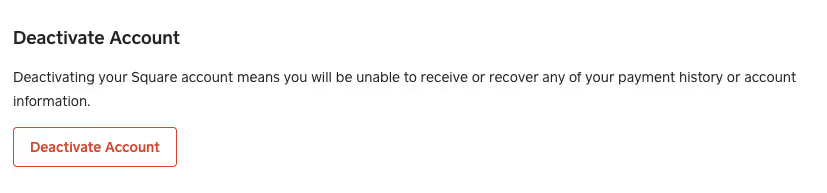
- Scroll down to find the Deactivate Account option.
- Square will prompt you with a series of confirmation steps, including asking you why you want to leave.
- Enter your password when prompted to confirm your identity.
- Click Deactivate Account to finalize the deletion.
You’ll receive a confirmation email from Square once the account has been deactivated.
Option 2: Contact Square Support
If you run into issues with the self-service option (which can happen, especially if there are pending issues on the account), you can contact Square Support directly:
- Visit squareup.com/help and use the live chat or phone support option.
- Explain that you want to permanently delete your account.
- A support agent will guide you through the process and help resolve any blockers.
One thing worth noting here: getting timely help from Square support can sometimes be a frustrating experience. If you’ve already dealt with long wait times or unhelpful responses, it might be a sign that your next payment processor should put customer support front and center. More on that in a moment.
What Happens After You Delete Your Account
Once your Square account is deactivated, here’s what to expect:
You’ll immediately lose access to your Square Dashboard, all sales history and transaction data, customer directories, and any connected apps or integrations. Your Square hardware will no longer work with the account. If you had a Square Online store, that will also go offline.
Square is required by law to retain certain financial records for a period of time even after account deletion, so don’t be surprised if some data is kept on their end for legal or tax purposes. This is standard practice for payment processors.
What to Look for in Your Next Payment Processor
If you’re leaving Square, you’re probably already thinking about what comes next. Whichever direction you go, customer support should be near the top of your list when evaluating options.
Payment issues don’t wait for business hours. A failed transaction, a held payout, or a chargeback dispute can seriously disrupt your day, and the last thing you want is to be stuck on hold or waiting days for an email response while your business is affected. The best payment processors give you a real person to talk to, fast.
Redde Payments is worth a serious look if you’re searching for a Square alternative. What sets us apart is our commitment to genuine, responsive customer support. You’re not just a ticket number in a queue. Our team is accessible, knowledgeable, and there when you actually need us, which is exactly what a lot of businesses miss after dealing with larger, more impersonal platforms.
If good support is a priority for your business (and it should be), checking out reddepayments.com is a solid first step.
Frequently Asked Questions
Can I reactivate my Square account after deleting it? No. Once deleted, your account cannot be recovered. If you want to use Square again in the future, you’d need to create a brand new account from scratch.
Will I be charged after I delete my account? If you’ve properly canceled all subscriptions before deletion, you shouldn’t be charged. However, any fees for the current billing period that have already been incurred may still appear on your final statement.
What happens to my Square gift cards? If your business had issued Square gift cards to customers, those cards will no longer be redeemable after your account is deleted. Make sure to address this with your customers beforehand.
Can I delete just one location instead of the whole account? Yes. If you have a multi-location account and only want to remove one location, you can do that from Account & Settings > Locations without deleting your entire account.
What if Square won’t let me delete my account? This usually happens when there’s a pending payout, an open dispute, or an unresolved chargeback. Contact Square Support to resolve the issue before trying again.
What should I use after leaving Square? There’s no one-size-fits-all answer, but if you’ve been burned by poor support at Square, look for a processor that makes it easy to reach a real person. Redde Payments is a great option for merchants who want that kind of relationship with their payment partner.
A Quick Checklist Before You Go
- Export all sales reports and transaction history
- Download your customer directory
- Cancel all paid subscriptions and add-ons
- Resolve any pending disputes or chargebacks
- Wait for all outstanding payouts to transfer to your bank
- Deactivate and unlink any Square hardware
- Disconnect your bank account
- Delete the account through the Dashboard or via Support
Deleting a Square account doesn’t have to be stressful. As long as you take the time to back up your data and settle any open items, the process is pretty straightforward. And once you’re done, you’ll be in a great position to find a payment processor that actually feels like a partner.
If you’re not sure where to start, Redde Payments is a good place to explore.
Get started with Redde
No matter what industry you're in, we make it easy to get approved and start processing. Competitive rates, fast setup, and a team that actually has your back. Our industry experts will walk you through every step of the way.



.png)